Open source
local-llm-studio
github.com/juanmmm21/local-llm-studio
Your private AI studio, 100% on your Mac.
- Lines
- 4,451
- Files
- 68
- Test files
- 5
- Commits
- 66
- Started
- 3 Jul 2026
- Last commit
- 3 Nov 2026
- Swift 97.9%
- Shell 2.1%
- 01
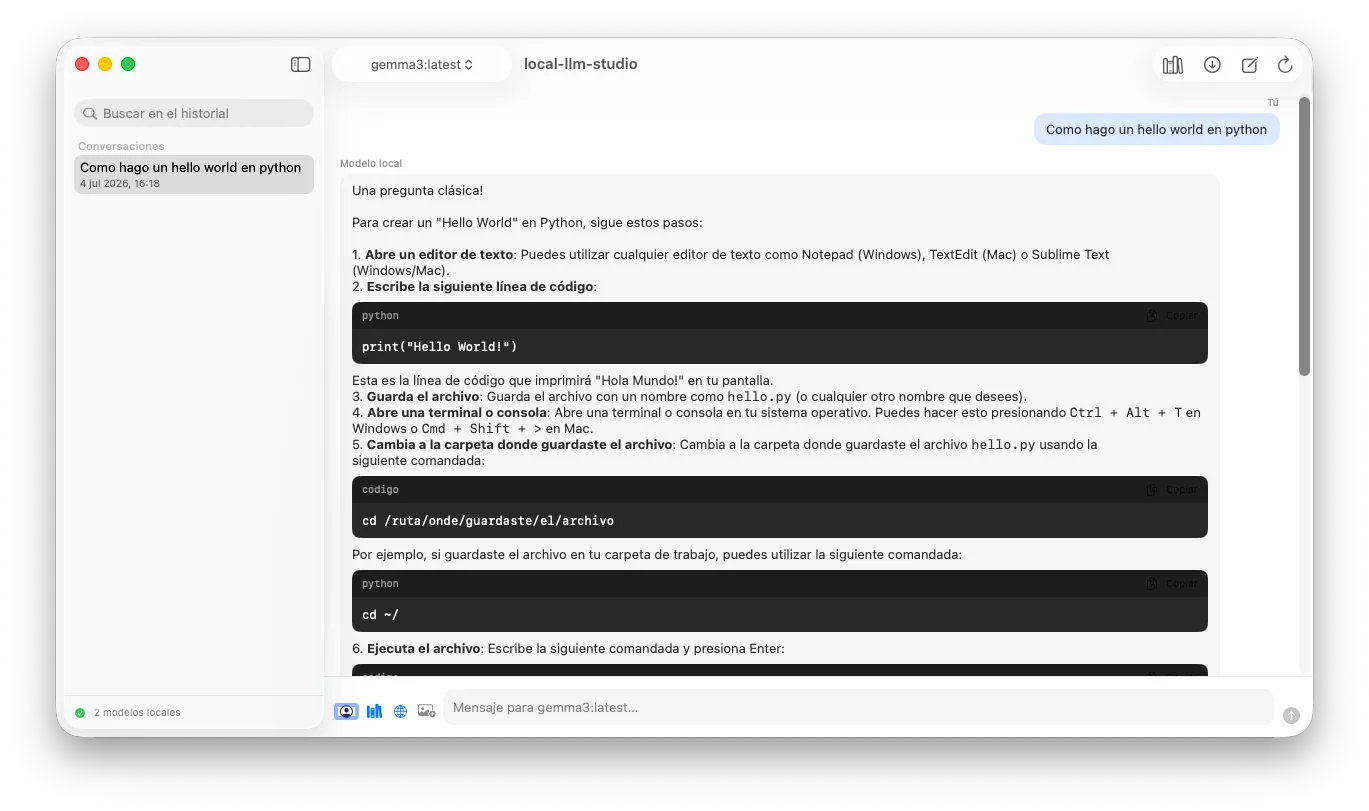
Chat with Llama, DeepSeek, Mistral, Gemma, Qwen and more through Ollama, streamed token by token.
- 02
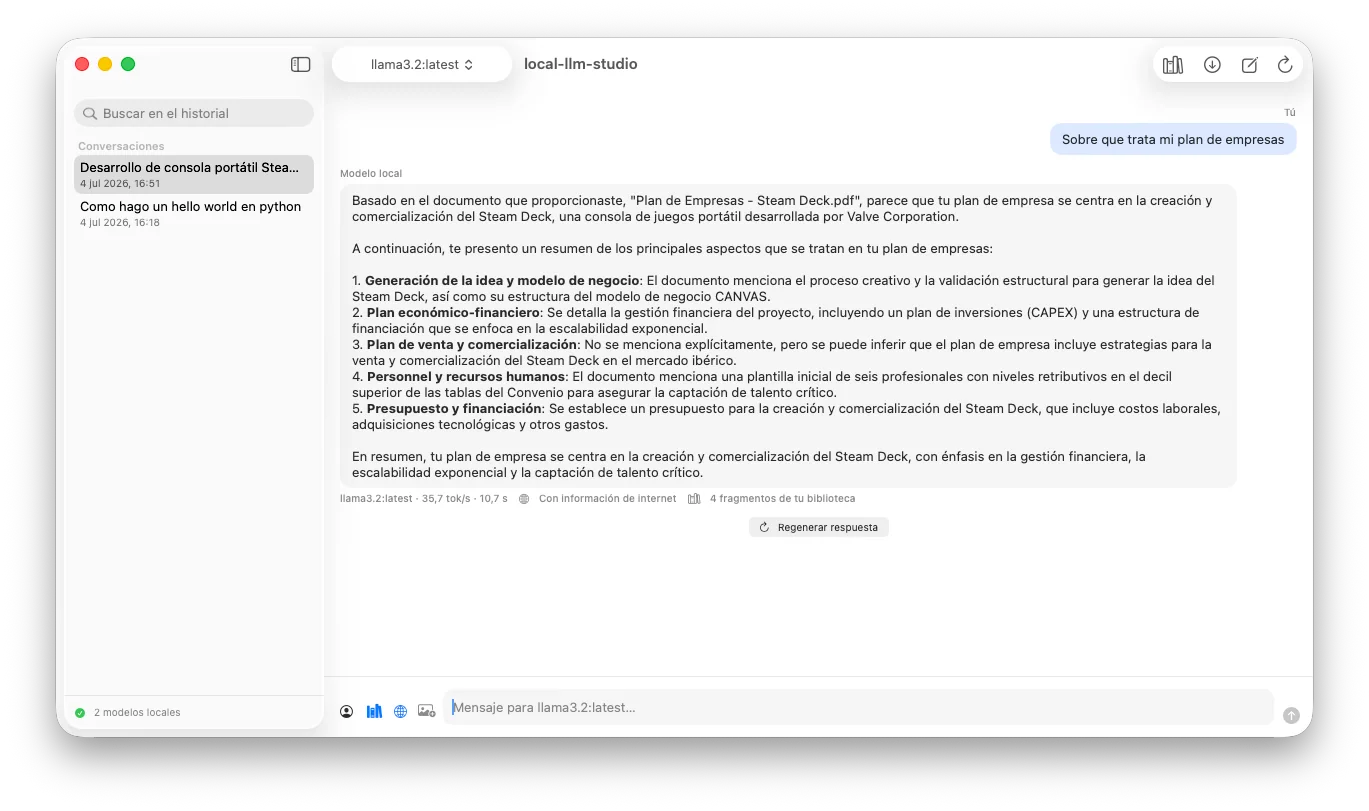
A private RAG library with verifiable sources: every answer shows the exact fragments it was given.
- 03
Optional hybrid web search — the model only goes online when you decide.
- 04
Zero external dependencies: SwiftUI, SwiftData, PDFKit and Foundation, nothing else.
README · 6 min read
Commits per week
Your private AI studio, 100% on your Mac.
Native macOS app (SwiftUI) to manage and chat with local language models —Llama, DeepSeek, Mistral, Gemma, Qwen, Phi, LLaVA…— through Ollama, with its own document library for private RAG and optional hybrid web search.
Screenshots
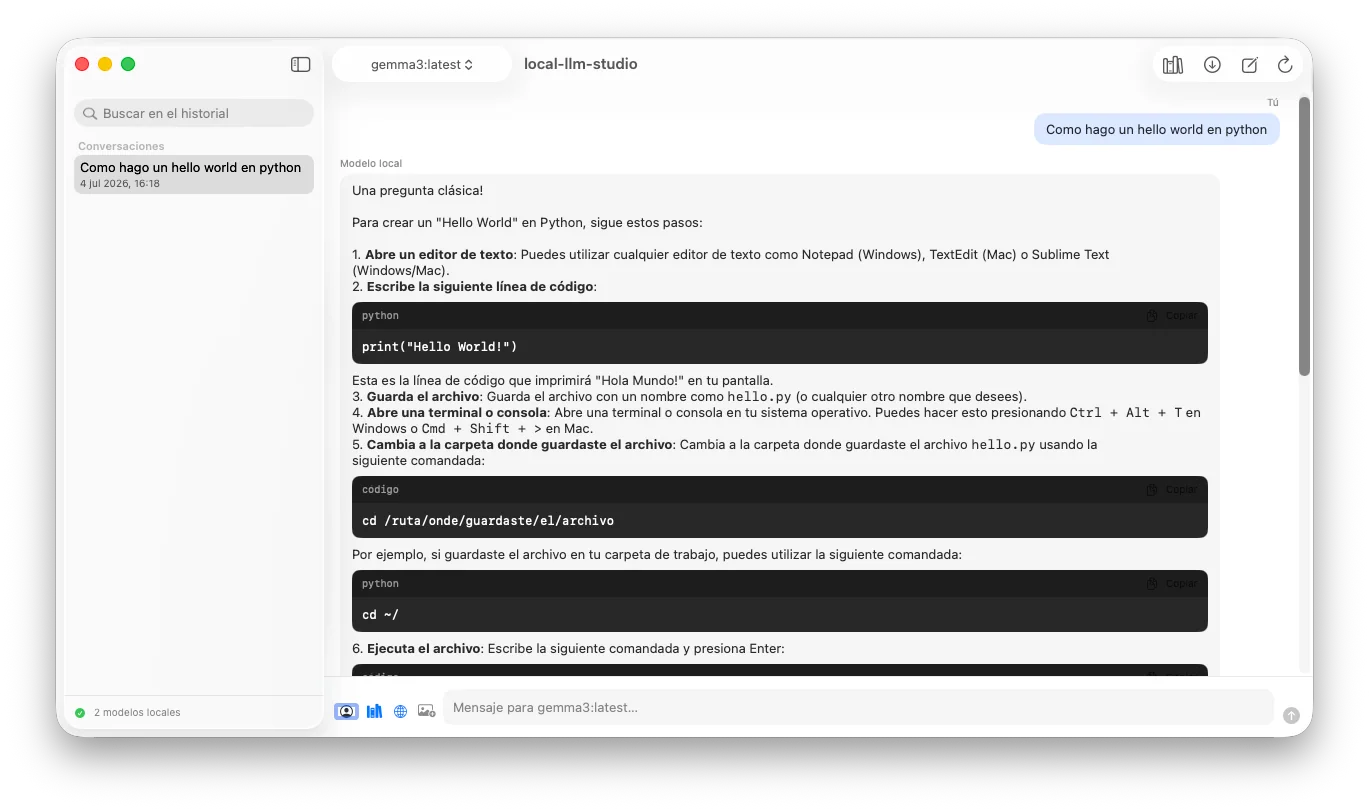
Chat with local models, with streaming responses, rich Markdown and copyable code blocks:
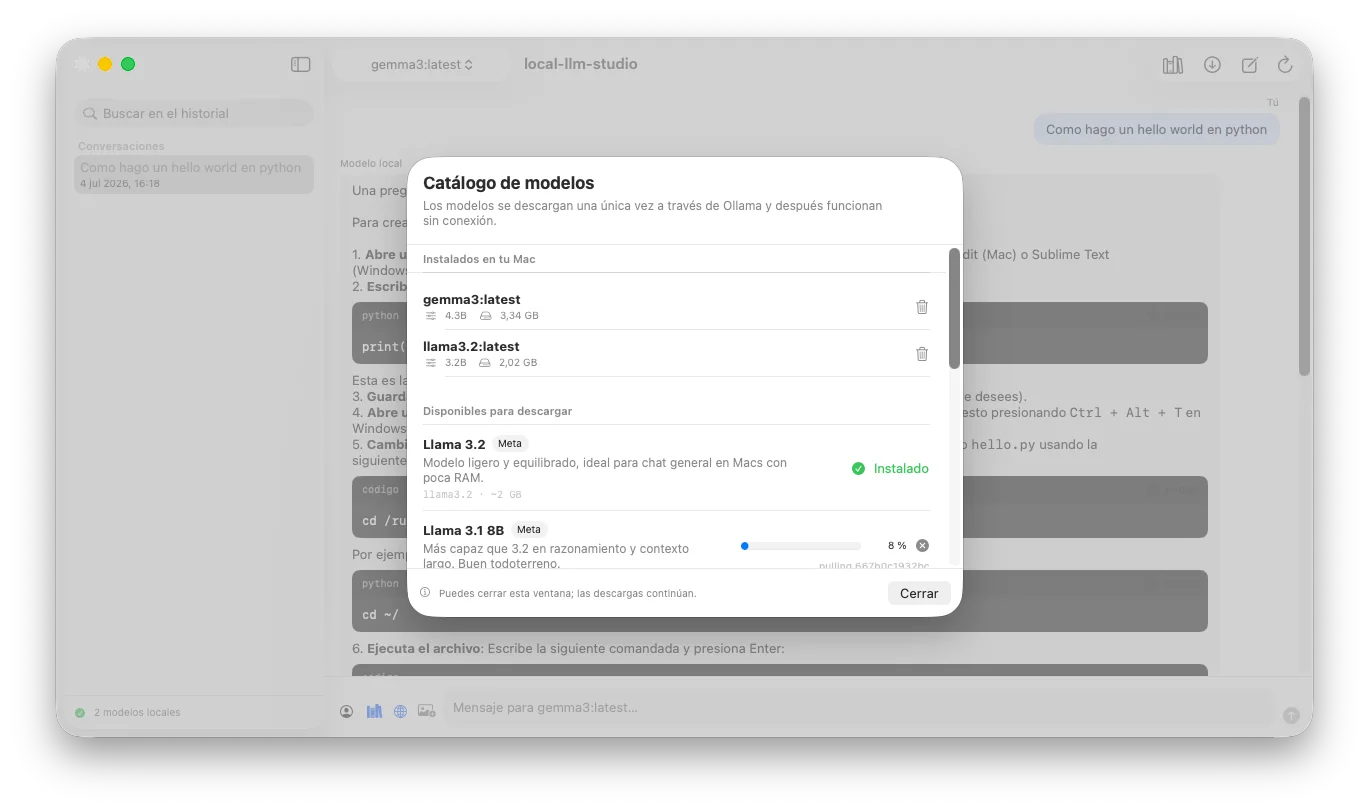
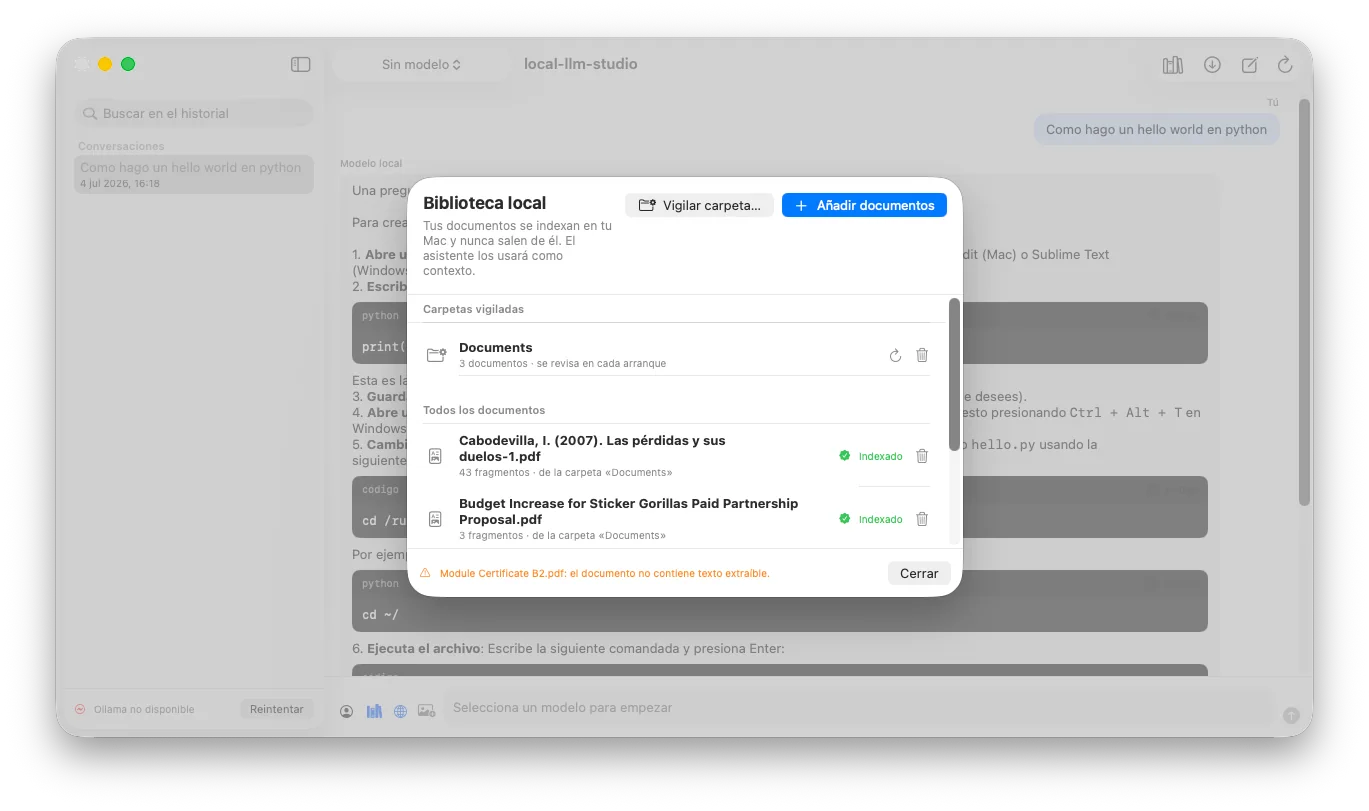
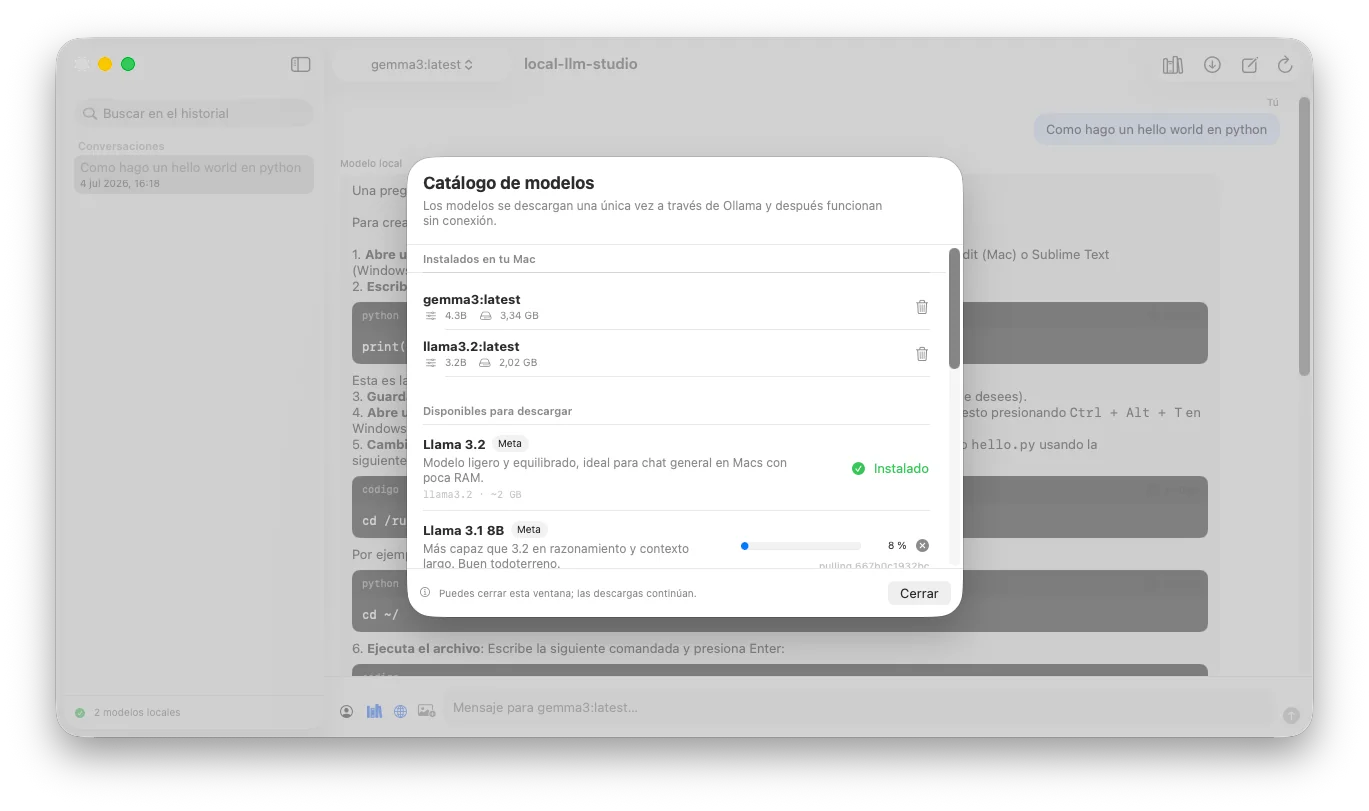
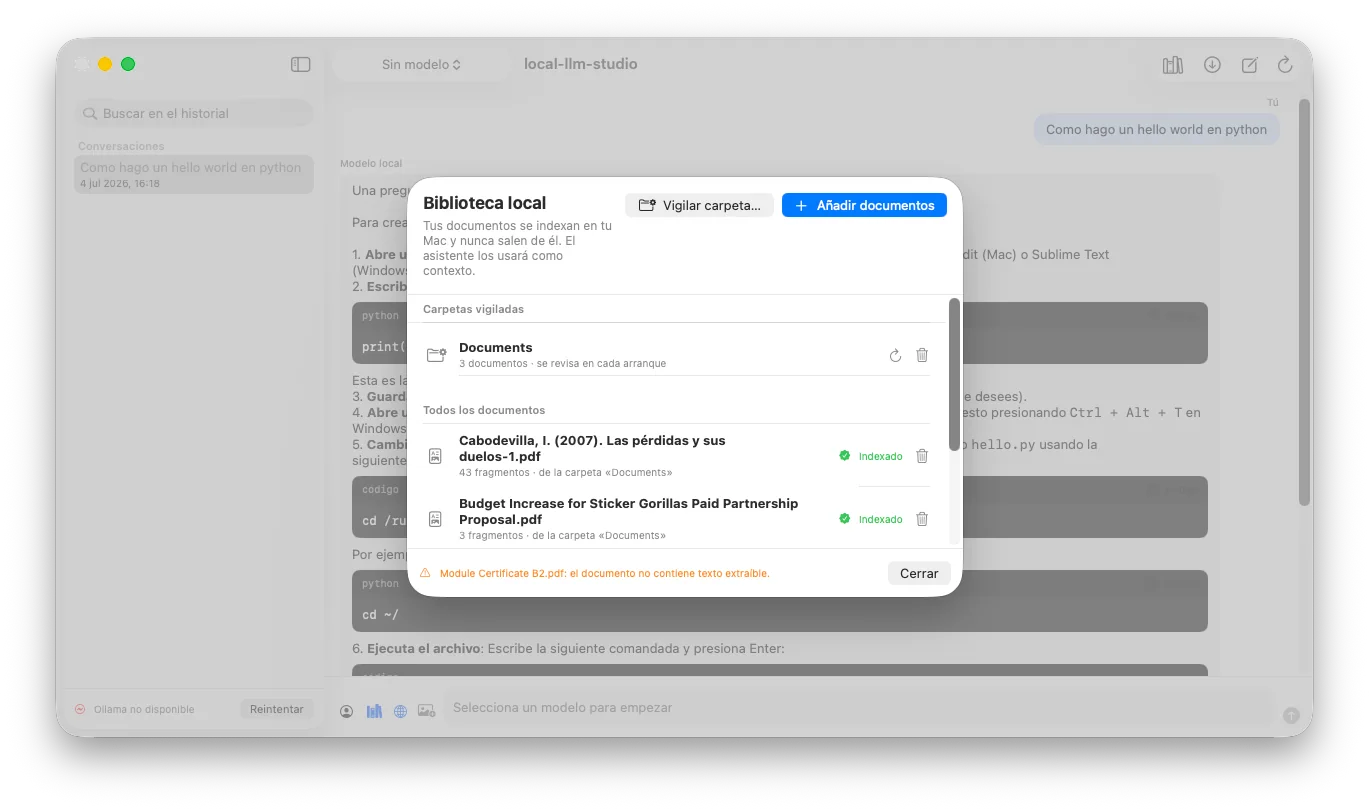
| Built-in model catalog | Private RAG library |
|---|---|
 |  |
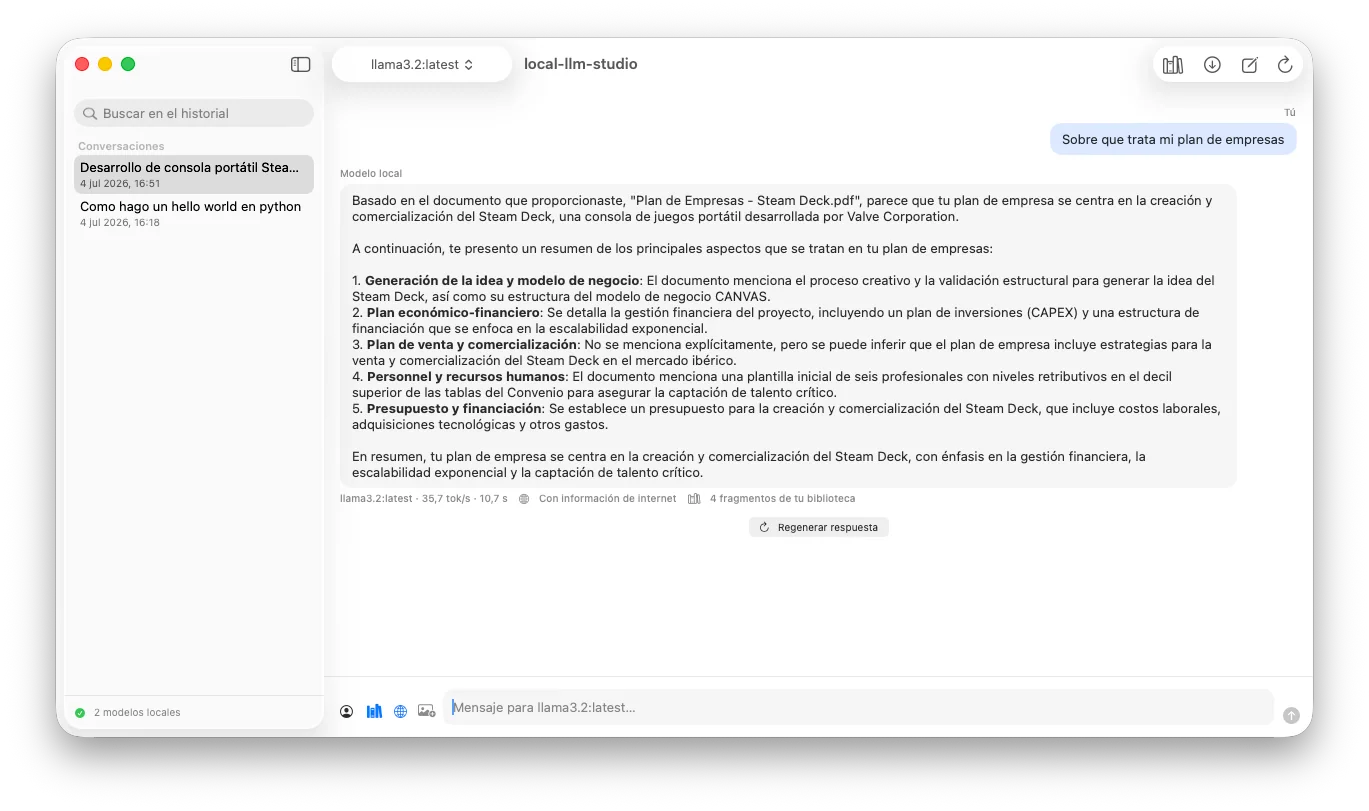
Verifiable sources: every response that used your library shows the exact fragments that were injected as context:
Why?
Cloud AI assistants force you to choose between capability and privacy. local-llm-studio removes that dilemma: all inference happens on your Mac, your conversations and documents never leave it, and you can still give the model on-demand internet access whenever you decide to.
- Privacy by design: chat, history, and the document library are processed and stored locally. No accounts, no telemetry, no paid APIs.
- Everything from the interface: download and remove models, index documents, and chat without ever touching the terminal.
- Zero external dependencies: only Apple frameworks (SwiftUI, SwiftData, PDFKit, Foundation). The project builds as-is, with no third-party packages to resolve.
Features
Chat with local models
- Token-by-token streaming responses, with instant cancellation that keeps the partial text.
- Model selector in the top bar; switch models mid-conversation.
- Regenerate the last response with one click (even with a different model) and edit and resend any of your messages: the conversation continues from that point.
- Per-conversation assistant templates (translator, code reviewer, writer, teacher, summarizer), each with its own system instructions.
- Automatic titles: the local model itself summarizes the conversation into a title after the first exchange.
- Multimodal chat: attach PNG/JPEG images and ask about them with vision models like LLaVA.
- Persistent history with SwiftData: rename conversations and search the whole history by title or content.
- Quick question from the macOS menu bar: a one-off query without opening the main window and without saving history.
Model management without a terminal
- Built-in catalog with a curated selection of the most relevant models in the ecosystem, with a description in Spanish, vendor, and download size.
- One-click download, live progress, concurrent and cancelable downloads (what's already downloaded is kept).
- Remove installed models from within the app to free up disk space, with confirmation of the space recovered.
- Memory indicator: see which models are currently loaded into RAM and how much they occupy, and evict them from memory without deleting them from disk.
- If Ollama isn't running, the app starts it on its own in the background; and if it isn't installed, a guided onboarding walks you through the first launch.
Document library (private RAG)
- Add Markdown, TXT, or PDF; the app stores a reference (never copies the file) and indexes it on your Mac.
- Watched folders: pick a folder and the library syncs itself on every launch —new documents get indexed and deleted ones disappear.
- Semantic search with local embeddings (
nomic-embed-text, which the app installs automatically on first launch), with keyword-based fallback if it isn't available yet. - Smart chunking that respects paragraphs with overlap between fragments.
- Relevant context is injected into the prompt citing the source document, and can be toggled on or off per conversation.
- Verifiable sources: every response that used the library shows, in an expandable view, the exact fragments that were injected as context.
Hybrid web search (optional)
- Disabled by default: a privacy toggle controls whether the assistant can query the internet, and the choice is remembered.
- No API keys or accounts: search via DuckDuckGo and full-text reading of the top pages, cleaned up natively.
- The local model answers citing sources with their URL, and every response that used the internet is clearly marked in the chat (also in the history).
Product experience
- Rich Markdown in responses: code blocks with a language tag and a copy button, even during streaming.
- Native Settings window (⌘,): Ollama host and port, system instructions, temperature, and context window.
- Generation metrics under each response: model, tokens per second, and duration.
- Export any conversation to Markdown from the history's context menu.
- Drag and drop onto the chat: images for the message, documents for the RAG library.
- First-launch onboarding: if Ollama isn't installed, a three-step visual guide replaces the error message.
Architecture
flowchart LR
    subgraph Mac["Your Mac"]
        UI["SwiftUI<br/>(Views + ViewModels @Observable)"]
        SD[("SwiftData<br/>history + library")]
        subgraph Servicios["Services (async/await actors)"]
            OS["OllamaService"]
            RAG["DocumentIndexer<br/>+ ContextRetriever"]
            WS["WebSearchService"]
        end
        OLL["Ollama<br/>localhost:11434"]
    end
    WEB["Internet<br/>(only if you enable it)"]

    UI <--> SD
    UI <--> Servicios
    OS <-->|"/api/chat · /api/tags<br/>/api/pull · /api/embed · /api/delete"| OLL
    RAG --> OS
    WS -.->|"search + pages"| WEB
OLL -.->|"model download"| WEB| Layer | Technology | Role |
|---|---|---|
| Interface | SwiftUI + @Observable | Three zones: history, chat, and model management. Smooth loading states. |
| Quality | XCTest | Unit test suite for Markdown parsing, RAG retrieval, chunking, and web parsing. |
| Concurrency | async/await, actor, AsyncThrowingStream | Streaming without blocking the UI; concurrency-safe services. |
| Persistence | SwiftData (+ .externalStorage for images) | Conversations, documents, fragments, and embeddings. |
| Inference | Ollama (local REST API) | Chat, embeddings, and model management on localhost:11434. |
| Documents | PDFKit + Foundation | Native text extraction, no third-party libraries. |
Privacy: what leaves your Mac and when
| Action | Network? | Destination |
|---|---|---|
| Chatting, indexing documents, searching history | No | Everything local |
| Downloading a model from the catalog | Yes (once) | Ollama registry |
| Assistant web search | Only with the toggle enabled | DuckDuckGo + result pages |
Getting started
Direct download
You can download the packaged app from the releases page: mount the DMG and drag the app to Applications.
Gatekeeper note: the app is signed locally (without Apple notarization, which requires a paid developer account). The first time, open it with right-click → "Open" and confirm. If you'd rather not trust binaries, build it yourself in a minute (below).
Requirements
- macOS 14.0 or later (Apple Silicon or Intel).
- Xcode 16 or later.
- Ollama installed (one-time download; everything works offline afterward).
Build and run
git clone https://github.com/juanmmm21/local-llm-studio.git
cd local-llm-studio
xcodebuild -scheme local-llm-studio -destination 'platform=macOS' build

# Run the test suite
xcodebuild -scheme local-llm-studio -destination 'platform=macOS' test
Or simply open local-llm-studio.xcodeproj in Xcode and press ⌘R. On first launch, the app will start Ollama if needed, offer you the catalog if you have no models, and prepare the semantic index on its own.
Keyboard shortcuts
| Shortcut | Action |
|---|---|
| ⌘↩ | Send message |
| ⇧⌘N | New conversation |
| ⇧⌘D | Model catalog |
| ⇧⌘L | Document library |
| ⌘R | Reload local models |
Project structure
local-llm-studio/
├── App/            # Entry point, SwiftData container, Settings, and menu bar
├── Models/         # Domain, settings, and JSON contracts for the local Ollama API
├── Services/       # OllamaService, RAG indexing, web search, export
├── ViewModels/     # Observable state (@Observable, MainActor)
├── Views/          # SwiftUI views (chat, catalog, library, onboarding, settings)
└── Resources/      # Assets (custom icon) and entitlements (App Sandbox)
local-llm-studioTests/  # Unit tests (XCTest)
Roadmap
- Phase 1 — Local connectivity: streaming chat, three-zone UI, Ollama auto-start.
- Phase 2 — Model catalog with built-in download and live progress.
- Phase 3 — Persistence with SwiftData and RAG library with local embeddings.
- Phase 4 — Hybrid web search with a privacy toggle and source indicator.
- Phase 5 — Management of installed models, auto-installed semantic index, history renaming and search, full page reading, and chat with images.
- Phase 6 — Product experience: rich Markdown, native Settings, metrics, export, drag and drop, onboarding, and custom icon.
- Phase 7 — Regenerate/edit messages, assistant templates, automatic titles, visible RAG sources, watched folders, memory indicator, menu bar, and test suite.
- Phase 8 — Showcase and distribution: screenshots, redesigned icon, CI with GitHub Actions, and releases with downloadable DMG.
License
Released under the MIT license.
Author
Developed by juanmmm21. The project follows a local-first philosophy: the power of modern AI with the privacy of something that never leaves your machine.