Open source
Menubar Telemetry
github.com/juanmmm21/claude-menubar-telemetry
Claude, Gemini and OpenAI plan usage at a glance, from the macOS menu bar.
- Lines
- 3,384
- Files
- 17
- Test files
- 0
- Commits
- 36
- Started
- 12 Jul 2026
- Last commit
- 26 Oct 2026
- Swift 97.5%
- Shell 2.5%
- 01
Real account-wide quota, read through Claude Code's own session — no API keys, no proxy.
- 02
A zero-setup log aggregator over ~/.claude/projects as a local fallback.
- 03
Gemini allowance and OpenAI API credit in the same popover.
- 04
Native Swift: launches instantly and stays under 20 MB of RAM.
README · 11 min read
Commits per week
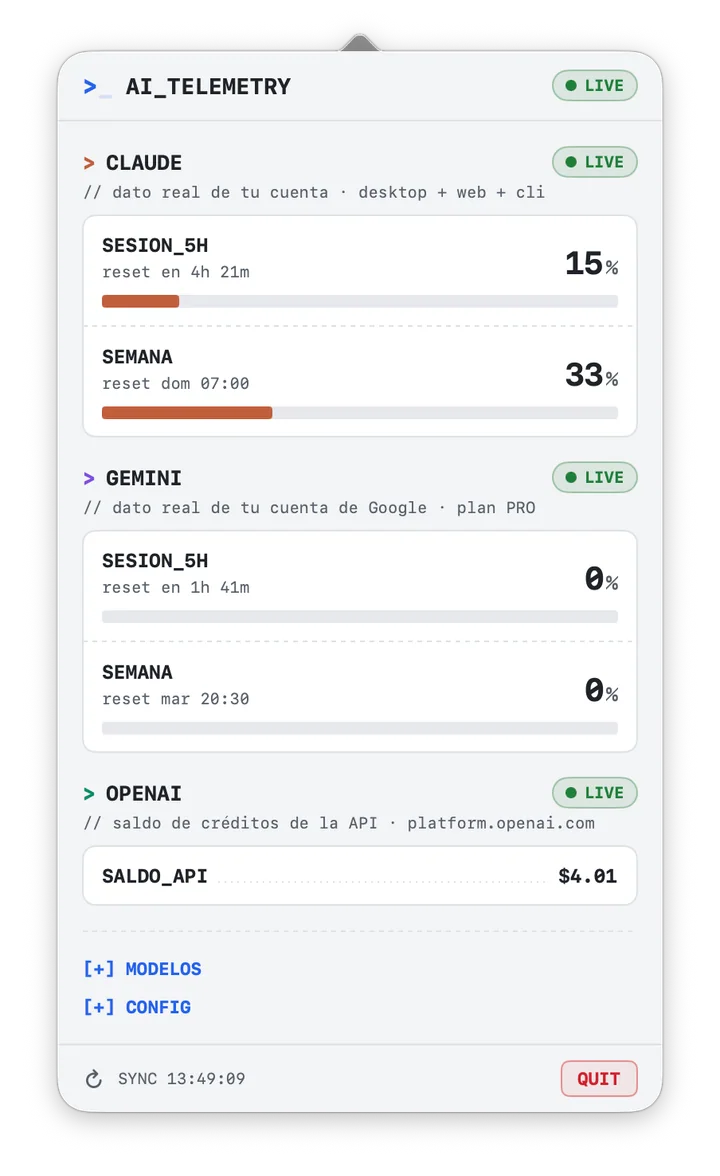
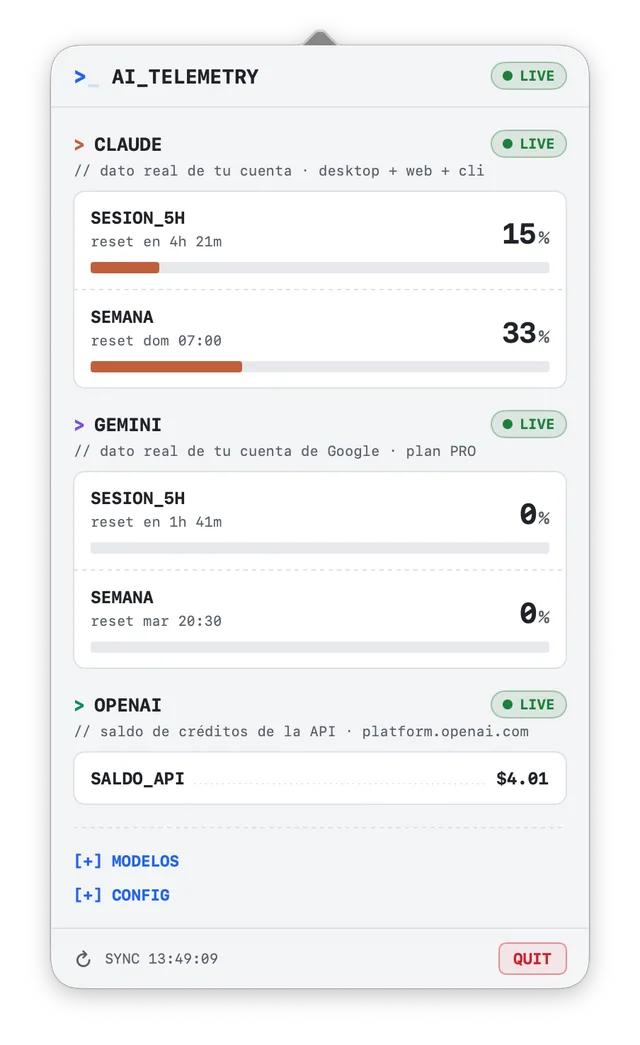
A native macOS menu bar utility that shows, at a glance, how much of your Claude and Gemini plan limits you've used — the real account-wide figures, with when each limit resets — and how much OpenAI API credit you have left.
The interface is an opaque popover with a terminal aesthetic — monospaced typography, SNAKE_CASE labels, full-width usage bars — that follows macOS light and dark mode and stays readable over any background.
Key Features
- 100% Native Swift/SwiftUI: Compiled directly to a lightweight macOS app bundle (no heavy Electron wrappers). Launches instantly and consumes < 20MB of RAM.
- Zero Setup Log Aggregator: Automatically watches and parses your local Claude Code sessions stored in
~/.claude/projects/line-by-line. No Anthropic API keys or proxies are required. - Real account-wide quota (optional): If you're signed in to Claude Code on this Mac, the app reuses that existing session to read your actual rate-limit usage across Desktop, web and CLI combined — not just an estimate from local CLI logs. See Privacy & Safety for exactly what that involves.
- Usage credits: Models billed against credits rather than the weekly plan quota (Fable, most notably) are tracked where they actually live — your monthly credit limit, how much of it you've spent, what's left, and any prepaid balance on the account.
- Gemini too: Right below Claude, the popover shows how much of your Google account's Gemini allowance you've used — the current 5-hour allowance and the weekly limit, the same figures as
gemini.google.com/usage, covering the web, mobile and every other Gemini app. Sign in to Google once from the popover and it stays connected. Gemini CLI users also get its per-model quota and local activity. - OpenAI API balance: Under Gemini, the credit balance left on your OpenAI API account, the same figure as the platform's billing page. Sign in to OpenAI once from the popover; no API key needed.
- Per-model weekly windows: When Anthropic publishes a separate weekly window for a model, it gets its own progress bar instead of a made-up percentage.
- Live Reset Countdown: Shows exactly when your current 5-hour session window resets, ticking down in real time.
- Multi-Model Breakdown: Groups prompts and tokens per model (Claude Fable, Sonnet, Opus…, and Gemini models if you use Gemini CLI) in a folding table.
- No Keychain password prompts: The Claude Code session is read through
/usr/bin/security, the same tool Claude Code uses to store it, so macOS hands it over without asking — not once a day, not after every token refresh. - Frosted-glass, terminal-style UI: Translucent popover over the system blur, monospaced typography (JetBrains Mono when installed) and terminal indicators. It sizes itself to its content: no empty space, and it grows when a drawer opens.
Design Showcase
The popover keeps a terminal look — monospaced typography, SNAKE_CASE labels, > section prompts, // comments for context — on opaque panels that follow the system's light or dark mode, so it reads the same over a white window as over a dark desktop. Every limit gets a full-width bar, a big percentage and when it resets (reset en 4h 53m, reset dom 07:00). Colors (light / dark mode):
- Claude: Clay
#C15F3C/#F0A07F - Gemini: Violet
#7B4FE0/#C3A6FF - OpenAI: Green
#0E8A6B/#3DD6AC - OK / warning / limit:
#1E7F3A/#9A6700/#CF222Ein light mode,#6FD08C/#FFD43B/#FF7B72in dark mode. Bars turn to the warning color at 70% and red at 90%; from 70% the percentage also gets a ⚠︎ icon, so the state never depends on color alone.
Everything fits in one view, so both providers can be read at a glance when you click the Menu Bar icon (terminal system icon):
- Header:
>_ AI_TELEMETRYwith the worst state of the three providers. Each section also has its own badge:● LIVE(real account data),● HIGH_USAGE(90%+),● RATE_LIMITED(limit reached),● LOGS_ONLY(Claude without a live session, local estimate),● LOGIN(Gemini or OpenAI waiting for you to connect the account),● NO_CREDIT(OpenAI balance at zero) or● NO_DATA. > CLAUDE: One line per limit — 5-hour session, all-models week and every model-scoped weekly window the account has — each with its bar, percentage and reset. Optionally (off by default, turn onEXTRAS_CLAUDEin[+] CONFIG), usage credits spent against the monthly limit, the prepaid balance when there is one and, when the account has no model-scoped windows, a plain Fable requests/tokens counter rather than an invented percentage.> GEMINI: Your Google account's Gemini app usage, exactly asgemini.google.com/usageshows it —SESION_5H(the current allowance, refreshed every 5 hours) andSEMANA(the weekly limit), each with its reset — plus your plan in the comment line. Until you connect your Google account it shows aCUENTA_GOOGLE · conectar →row instead. If you also use Gemini CLI, its per-model quota (CLI_…) and last-24h activity appear underneath.> OPENAI:SALDO_API, the credit balance left on your OpenAI API account, exactly asplatform.openai.comshows it on the billing page. Until you connect your OpenAI account it shows aCUENTA_OPENAI · conectar →row instead.[+] MODELOS: Folded by default; prompts and tokens for the 6 most-used models of Claude Code (all history) and, if you use it, Gemini CLI (7 days).[+] CONFIG: Start with macOS,EXTRAS_CLAUDE(show Fable, credits and prepaid balance),DESCONECTAR_GOOGLE/DESCONECTAR_OPENAI(forget the app's Google or OpenAI session) and the fallback limits used when there's no live Claude data. Only one drawer is open at a time, so the popover always fits on screen.- Footer Controls: Manually refresh statistics, see the last sync time, or quit.
Privacy & Safety
- Local-first, with optional read-only network calls: by default the app reads your local Claude Code session logs (
~/.claude/projects/**/*.jsonl) and Gemini CLI conversation logs (~/.gemini/tmp/*/chats/) entirely offline. If you're signed in to Claude Code on this Mac, it additionally reuses that existing OAuth session to issue aGETtoapi.anthropic.comat most once a minute. That request consumes no quota and no tokens; it's the same endpoint the CLI's own/usagecommand reads. This is the only way to show the exact quota used across Desktop, web and CLI combined; a local log parser alone cannot see usage that happened outside the CLI. - How the Claude Code session is read, and why there's no password prompt any more: Claude Code keeps its session in the macOS Keychain under the item
Claude Code-credentials, but it doesn't use the Keychain API to do it: it shells out to/usr/bin/security. That makes/usr/bin/securitythe only trusted application on the item, which is why earlier versions of this app (which read it through the Keychain API) got a password dialog every time Claude Code renewed its token. The app now reads the item with that very same command (security find-generic-password -s "Claude Code-credentials" -w), so macOS returns it without asking, exactly as it does for the CLI. If Claude Code stores its session in~/.claude/.credentials.jsoninstead, that file is used. - The app never writes Claude Code's credentials and never sends your token anywhere except Anthropic's own API: it only reads them, keeps the access token in memory, and deliberately ignores the refresh token — renewing the session on our own could rotate the CLI's token and log you out of your own terminal. When the token expires, the next time you use Claude Code renews it and the app picks it up.
- Gemini app usage: Google publishes no API for it; the only source is the
gemini.google.com/usagepage, which needs a signed-in Google session. The app does not read your browser's cookies (Chrome encrypts them with a Keychain key, which would bring the password prompts back). Instead, theCUENTA_GOOGLE · conectar →row opens a Google sign-in window inside the app; the session is stored in the app's own WebKit storage. When you open the popover, the app loads that page in a hidden web view at most once a minute and reads the two percentages and reset times from its text — nothing is sent anywhere else.[+] CONFIG → DESCONECTAR_GOOGLEdeletes that session. Because it reads a web page rather than an API, a redesign of that page by Google can break it; the section then says so and the rest of the app keeps working. - OpenAI API balance: OpenAI publishes no API for the remaining credit balance. The undocumented
dashboard/billing/credit_grantsendpoint other tools use rejects project keys (sk-proj-…), which are the only kind you can create today, so the app doesn't ask for any key. Instead, theCUENTA_OPENAI · conectar →row opens an OpenAI sign-in window inside the app; the session is stored in the app's own WebKit storage. When you open the popover, the app loadsplatform.openai.com/settings/organization/billing/overviewin a hidden web view at most once a minute and reads theAPI credit balancefigure from its text (only the standalone label and the amount line right under it, so the "when your credit balance reaches $0" notice is never mistaken for it).[+] CONFIG → DESCONECTAR_OPENAIdeletes that session. Like the Gemini page, a redesign by OpenAI can break it; the section then says so. - Gemini CLI: if you signed in to Gemini CLI with Google, the app reads
~/.gemini/oauth_creds.jsonand asks Google's Code Assist API (cloudcode-pa.googleapis.com) for your plan and remaining quota, the same calls Gemini CLI makes for/stats. Neither consumes quota. Google access tokens only last an hour, so when the one in that file has expired the app renews it with Gemini CLI's public OAuth client; Google doesn't rotate the refresh token when doing so, so this can't log the CLI out. The renewed token lives only in memory — the app never writes to~/.gemini. Gemini CLI setups using an API key, Vertex AI or encrypted credential storage have no such session, so only the local log figures are shown. - Upgrading from an earlier version: older versions kept a copy of the Claude token in a Keychain item of their own named
com.juanmmm21.ClaudeTelemetry.session. It's no longer used; you can delete it from Keychain Access if you want. - Fails closed, not open: if you aren't logged into Claude Code, Google, OpenAI or Gemini CLI, a session has expired, Google or OpenAI changes its page, or you're offline, each section says why in its
//comment and falls back to what it can still show (for Claude, the local log-only approximation described below) — the app never crashes or blocks waiting on the network. - Read-only on your session logs: local log parsing only accumulates numeric token values; it never writes to, deletes, or modifies your project or Claude session files.
How to Build & Run
Prerequisites
- A Mac running macOS 12.0 or newer.
- Xcode Command Line Tools installed (provides the
swiftccompiler). You can install it by runningxcode-select --installin your terminal.
Step 1: Clone the Repository
git clone https://github.com/juanmmm21/claude-menubar-telemetry.git
cd claude-menubar-telemetry
Step 2: Build the Application
We provide an automated compilation script build.sh that cleans, transcodes the source image to a native macOS .icns format, compiles the binary, and packages the bundle structure:
chmod +x build.sh
./build.sh
Step 3: Run and Install
Once the build is complete, you can launch the app directly:
open build/ClaudeTelemetry.appTo install it permanently, simply drag the compiled app inside the build/ folder into your macOS /Applications directory. When updating, quit the running copy first (QUIT in the popover, or killall ClaudeTelemetry).
Step 4: Connect your accounts
- Claude: nothing to do — if you're signed in to Claude Code on this Mac, the
> CLAUDEsection shows● LIVEstraight away. If it says the session expired, open Claude Code once and it renews it. - Gemini: click
CUENTA_GOOGLE · conectar →in the> GEMINIsection and sign in to Google in the window that opens. It closes by itself when you're done and the section switches to● LIVE. You only do this once. - OpenAI: click
CUENTA_OPENAI · conectar →in the> OPENAIsection and sign in to OpenAI (email, Google, Apple or Microsoft) in the window that opens. It closes by itself a couple of seconds after you land on the platform, and the section switches to● LIVE.
File Structure
├── build.sh                 # Standard macOS build script
├── .gitignore               # Excludes intermediate compiler targets
├── README.md                # Project documentation
├── docs/
│   └── screenshot.png       # Popover screenshot used above
└── src/
    ├── main.swift                # Application entry point
    ├── AppDelegate.swift         # Status bar button and NSPopover controllers
    ├── DashboardView.swift       # SwiftUI interface (panels, usage bars, drawers)
    ├── TelemetryManager.swift    # Log parsing logic, cache system & rates
    ├── AccountUsageService.swift # Optional live account-quota & usage-credits lookup
    ├── ClaudeSessionStore.swift  # Prompt-free read of the Claude Code session
    ├── GeminiUsageService.swift  # Gemini CLI session & per-model daily quota
    ├── GeminiLogScanner.swift    # Gemini CLI conversation logs (prompts & tokens)
    ├── GeminiWebUsageService.swift # Gemini app usage from gemini.google.com/usage
    ├── OpenAIBillingService.swift  # OpenAI API credit balance from platform.openai.com
    ├── LaunchAtLoginService.swift # "Start with macOS" registration (SMAppService)
    ├── Theme.swift               # Light/dark palette, provider colors & typography
    └── AppIcon.png               # High-resolution source icon (1024x1024)
How Quota Tracking Works
- Claude Pro/Max limits are a continuous utilization score, not a request counter. Anthropic tracks a rolling 5-hour window and a rolling 7-day window, each as a single percentage of the account's total allowance — there's no per-request "slot" that individually expires. There is exactly one reset time per window, not one per request.
- Some models are billed against credits instead of that quota. Fable is the current example: once the plan's allowance is used up, its consumption is paid from usage credits, which carry their own monthly limit, their own spend counter and their own reset — not a percentage of the weekly window. The app reads that state directly (limit, spent, remaining, prepaid balance) rather than trying to express it as a share of a quota it doesn't belong to.
- With a live session (see Privacy & Safety): the app reads real percentages, real reset times, per-model weekly windows and credit state directly from the account, so what you see matches it exactly.
- The Gemini app uses compute-based limits. Google measures app usage (web, mobile, Workspace side panels…) as an allowance that refreshes every 5 hours, capped weekly, consumed faster by heavier models and features; it shows only percentages, never a prompt count. The app shows those same two percentages.
- Gemini CLI quotas are daily and per model. Google's Code Assist backend reports, for each model, the fraction of today's requests still available and when it resets; the app shows the used share of each one. Free "Login with Google" accounts, Google AI Pro/Ultra and Code Assist Standard/Enterprise each have different limits, and the backend reports whichever applies to your account.
- Without a live session: the app falls back to a local approximation — it counts your own typed prompts in
~/.claude/projects/**/*.jsonlwithin the last 5 hours / 7 days and divides by a configurable limit (see the settings drawer in the app). This is a rough proxy, not a real measurement: it only sees Claude Code CLI activity, ignores Desktop/web/mobile usage, and doesn't account for how much a given request actually costs against the real utilization score.
Author
Built by juanmmm21 (https://github.com/juanmmm21). Senior Developer & Observability enthusiast.